Core Concepts
Webiny SDK
Programmatic interface to interact with Webiny from external applications.
- What the Webiny SDK is and when to use it
- How to install and initialize the SDK
- Core concepts: Result pattern, fields parameter, TypeScript generics
Overview
The Webiny SDK (@webiny/sdk) is a TypeScript library providing a programmatic interface to interact with your Webiny instance from external JavaScript or TypeScript applications like Next.js, Vue, SvelteKit, or Node.js scripts.
When to Use the SDK
The SDK is for external applications that need to read or write content from Webiny. This is different from:
- Admin extensions - Building within the Webiny Admin UI
- API extensions - Adding backend logic via Lambda extensions
Use the SDK when your frontend or backend application lives outside Webiny and needs to interact with Webiny’s content.
Installation
Install the package:
Initialize once with your API credentials:
Run yarn webiny info in your Webiny project to find your API endpoint URL. Use the base domain (e.g., https://xxx.cloudfront.net), not the full path.
What the SDK Provides
The SDK provides access to Webiny applications through namespaced modules:
| Module | Webiny App | Operations |
|---|---|---|
sdk.cms | Headless CMS | List, get, create, update, publish, unpublish entries |
Authentication
The SDK authenticates using an API key token generated in the Webiny Admin application (Settings → API Keys). Without a valid token, all SDK calls are rejected.
 API Keys in Webiny Admin
API keys have configurable permissions for each Webiny application (Headless CMS, File Manager, etc.).
Core Concepts
Result Pattern
Every SDK method returns a Result object instead of throwing errors. Check success with isOk():
This makes error handling explicit—you can’t accidentally forget to handle failures.
Fields Parameter
The fields parameter specifies which fields to return, keeping responses lean:
When omitted, the SDK returns all fields. The depth parameter (default: 1) controls how deeply reference fields are resolved.
TypeScript Generics
SDK methods accept generic type parameters for fully typed returns:
Error Handling
All SDK methods return Result objects. Always check for errors:
Best Practices
Environment Variables
Store credentials in environment variables:
Singleton Instance
Create one SDK instance and reuse it:
Import this instance throughout your application.
Type Safety
Define interfaces for your content models:
Use generics with SDK calls:
SDK Playground
The SDK Playground is an interactive environment in Webiny Admin where you can test SDK operations without writing code. It provides a visual interface for exploring available methods, testing queries, and seeing responses in real-time.
To access the SDK Playground, click Support in the bottom-left corner of Webiny Admin and select SDK Playground:
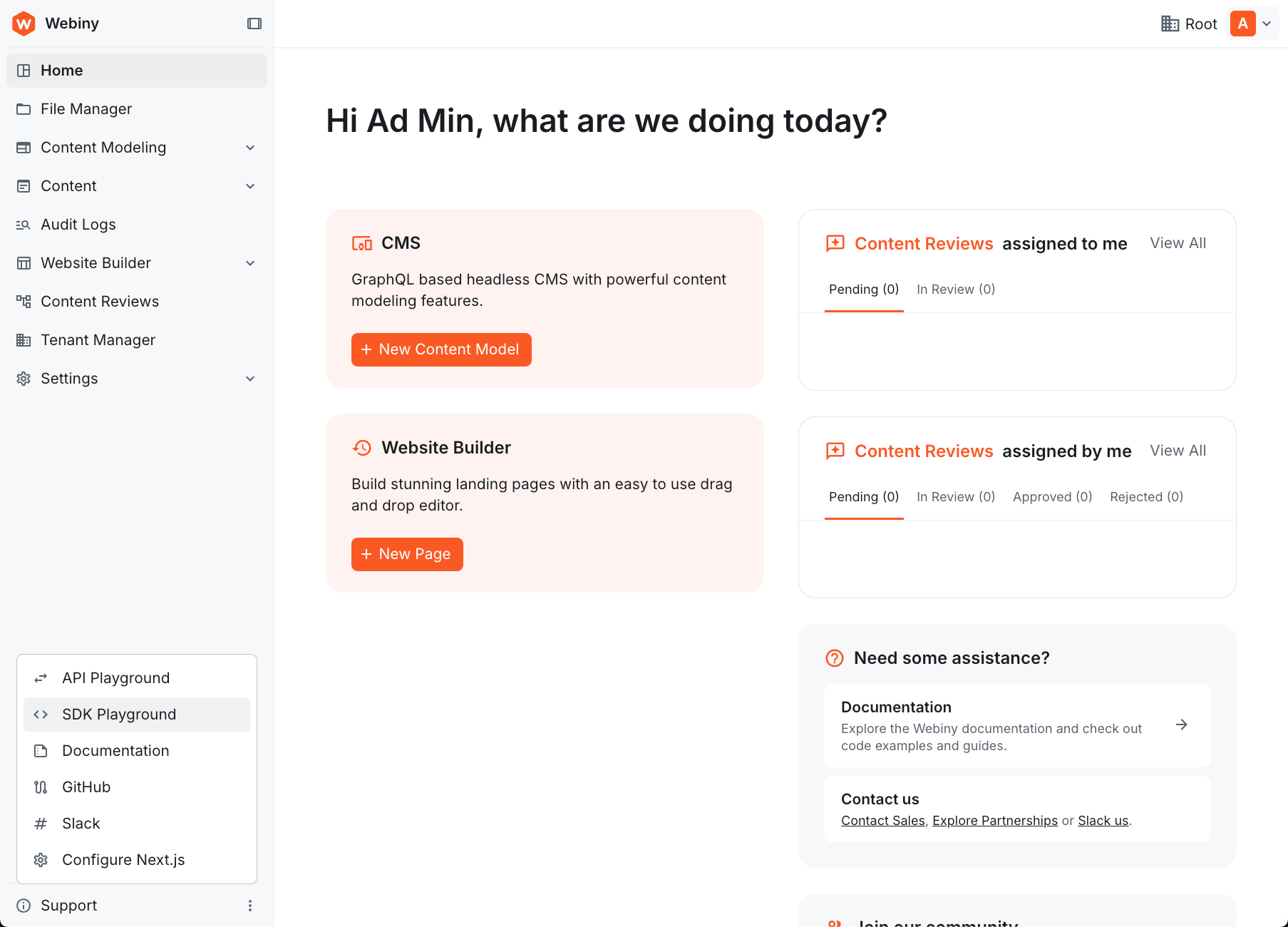 Webiny Admin sidebar with the Support menu open, showing the SDK Playground option
The playground provides an interactive interface where you can select SDK operations, configure parameters, and see the results:
 SDK Playground interface showing method selection, parameters configuration, and response display
Key features:
- Select SDK methods from a dropdown (e.g.,
cms.listEntries,cms.getEntry) - Configure method parameters via form inputs
- Execute operations and see formatted responses
- Test authentication and permissions
- Explore available operations without writing code
The SDK Playground is useful for:
- Learning available SDK methods
- Testing queries before implementing in code
- Debugging API key permissions
- Exploring response structures
- Prototyping SDK integrations